
Download MoonBeam – AI writing tool for essays, blogs, Twitter threads, and YouTube scripts
Overview of MoonBeam
MoonBeam is a multi‑purpose AI writing tool that aims to eliminate the dreaded blank‑page syndrome for anyone who creates written content. Available in a free tier and a feature‑rich Pro version, MoonBeam positions itself as a “wizard” that guides users from the initial idea all the way to a polished first draft. Whether you are a student drafting a college admission essay, a marketer planning a blog post, a creator scripting a YouTube video, or a social‑media manager preparing a Twitter thread, MoonBeam promises to generate a solid outline and a draft that you can edit and expand.
The core idea is simple: select a persona, pick a template that matches your content type, feed in a subject, target audience, and any relevant keywords, and let the AI craft a structure that saves you hours of brainstorming. While MoonBeam does not claim to write a complete, publish‑ready article on its own, it provides a reliable scaffold that reduces the time spent on research, organization, and initial wording. The tool’s interface is clean, the persona‑driven workflow is intuitive, and the integration with popular publishing platforms like WordPress makes it a handy sidekick for fast‑paced content teams.
In the free version you get basic outline generation, while the Pro upgrade unlocks advanced formatting, multiple draft versions, and priority support. Overall, MoonBeam is positioned as a bridge between raw ideas and fully‑fledged content, offering a secure, cloud‑based environment that updates regularly to stay compatible with the latest AI models.
Key Features and System Compatibility
- Persona‑Driven Wizard: Choose from personas such as Content Marketer, Student, Educator, or Writer to receive prompts tailored to your role.
- Template Library: Over 20 ready‑made templates for blog posts, essays, Twitter threads, YouTube scripts, college admission essays, and more.
- AI‑Generated Outlines: Automatic creation of a structured outline based on subject, audience, and keywords.
- First‑Draft Drafting: The tool produces a draft that follows the outline, allowing you to focus on polishing rather than starting from scratch.
- Keyword Integration: Input target keywords to ensure the draft aligns with SEO best practices.
- Pro Enhancements: Multiple draft versions, custom styling, export to WordPress, and priority customer support.
- Secure Cloud Storage: All data is encrypted during transfer and at rest, complying with GDPR and CCPA standards.
- Regular Updates: Monthly AI model improvements keep the output relevant and accurate.
MoonBeam is built as a web‑based SaaS application, which means it runs in any modern browser without the need for a heavy local installation. The platform officially supports Windows 10/11, macOS Catalina and later, as well as Chrome OS. Because it is accessed via HTTPS, users on Android and iOS devices can also take advantage of the responsive web interface, though a dedicated mobile app is not yet available.
The compatible operating systems include Windows, macOS, Linux (through browsers), Android, and iOS. System requirements are minimal: a stable internet connection, a recent browser version (Chrome, Edge, Firefox, or Safari), and at least 4 GB of RAM for optimal performance when handling larger drafts. MoonBeam’s cloud‑first architecture ensures that updates are pushed automatically, so users never have to download patches or worry about version mismatches.
This cross‑platform flexibility makes it a suitable choice for freelancers, agencies, and educational institutions that operate on mixed‑OS environments.
Installation, Setup, and Everyday Use
Getting Started – No Download Required
Since MoonBeam is a web‑based service, the installation process is essentially a secure sign‑up. Visit moonbeam.ai, click the “Get Started” button, and choose either the free plan or the Pro trial. After confirming your email address, you’ll be redirected to the dashboard where the MoonBeam Wizard awaits. There is no software to install, which eliminates compatibility headaches and frees up disk space.
Step‑by‑Step Workflow
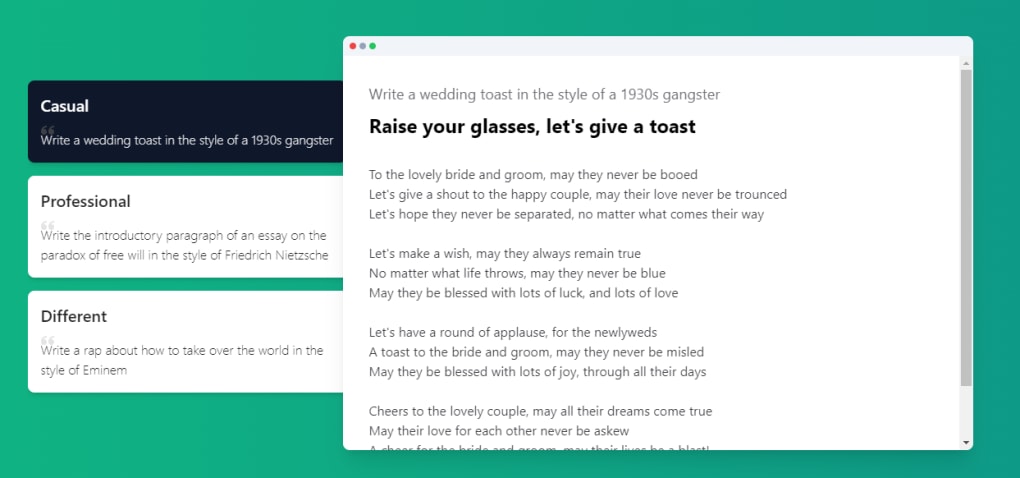
- Select a Persona: From the drop‑down menu, pick a role that matches your project (e.g., Content Marketer for a blog post or Student for an essay).
- Choose a Template: Once the persona is set, a curated list of templates appears. Choose the one that aligns with your content type.
- Enter Core Details: Input the subject matter, target audience, and any required keywords. Some templates may ask for tone, word count, or specific sections.
- Generate Outline: Click “Create Outline.” MoonBeam’s AI will instantly produce a hierarchical structure, complete with headings, sub‑headings, and suggested bullet points.
- Draft the Content: Press “Write Draft.” The AI expands the outline into a coherent first draft, adhering to the style and tone you indicated.
- Edit & Refine: Use the built‑in editor to adjust phrasing, add personal anecdotes, or incorporate additional research. The Pro version offers “Regenerate Section” for targeted rewrites.
- Export or Publish: Export the finished document as a .docx, .pdf, or directly push it to WordPress via the integration button. You can also copy the HTML for web publishing.
For teams, MoonBeam supports collaborative editing: multiple users can comment on the same draft in real time, making it ideal for remote content creation. The platform also logs version history, so you can revert to previous drafts if needed. If you encounter any issues, the Help Center provides step‑by‑step tutorials, and Pro users receive live chat support. Overall, the absence of a traditional install process, combined with a guided wizard, makes MoonBeam an exceptionally low‑friction tool for both beginners and seasoned writers.
Pros, Cons, Frequently Asked Questions, and Our Review
Pros
- Intuitive persona‑driven interface reduces learning curve.
- Extensive template library covers a wide range of content types.
- AI generates both outlines and first drafts, saving time.
- Web‑based, so it works on Windows, macOS, Linux, Android, and iOS.
- Secure cloud storage with regular AI model updates.
- Free tier available for casual users; affordable Pro upgrade.
Cons
- Drafts may require substantial editing for tone consistency.
- No dedicated mobile app; mobile use relies on browser experience.
- Advanced features (multiple drafts, WordPress sync) locked behind Pro.
- Limited support for non‑English languages.
- Heavy reliance on internet connectivity; offline mode unavailable.
FAQ – MoonBeam
Can I use MoonBeam without an internet connection?
No. MoonBeam operates entirely in the cloud, so a stable internet connection is required for generating outlines and drafts.
Is there a free version, and what does it include?
Yes. The free tier provides access to the basic persona wizard, a limited set of templates, and single‑draft generation. Export options are limited to .docx and copy‑paste.
How does MoonBeam ensure my data is secure?
All data transfers use HTTPS encryption, and stored drafts are encrypted at rest. MoonBeam complies with GDPR and CCPA regulations, and does not sell user content to third parties.
Can I integrate MoonBeam with WordPress directly?
Pro users have a one‑click WordPress export feature that publishes the draft as a new post or page, preserving headings and formatting.
What is the pricing model for the Pro version?
MoonBeam Pro is offered at $14.99 per month or $149 per year, which includes unlimited drafts, multi‑draft regeneration, priority support, and advanced export options.
Our Verdict
MoonBeam shines as a rapid‑prototype tool for anyone who needs a structured start to their writing projects. Its persona‑driven approach feels personal, and the template library covers most everyday content needs. While the AI‑generated drafts still demand a human touch for nuance, the time saved on brainstorming and outlining is undeniable. For freelancers on a budget, the free tier offers enough value to get started, and the Pro plan is reasonably priced for teams that need collaborative features and direct publishing integrations. In short, if you’re looking for a secure, cross‑platform assistant that helps you move from idea to outline in seconds, MoonBeam is a solid choice.
Conclusion – Get Started with MoonBeam Today
Whether you’re a student fighting writer’s block, a marketer racing against deadlines, or a creator looking to streamline video script production, MoonBeam delivers a fast, secure, and AI‑enhanced workflow that turns vague concepts into concrete outlines and first drafts. The free version lets you test the core wizard without commitment, while the Pro subscription unlocks powerful collaboration tools and seamless WordPress publishing. Don’t let another blank page slow you down—download MoonBeam, select your persona, and watch your ideas take shape in minutes.



.png)



